
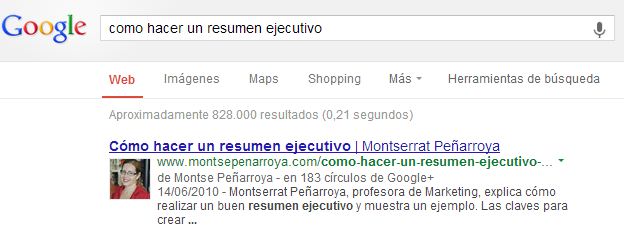
I am taking advantage of these calm days to prepare a class that I call “Internet Update"In it I explain to former students from previous years the new features of this last course so that they are always up to date.
It's amazing how many things change in a year! From trends in design, usability, new tools, new social networks, and of course, changes in Google's algorithm.
Among all these changes, there is one of special importance both at the personal branding level and at the SEO level.
- At the level of personal brand management: This involves getting your photo to appear next to Google results when they refer to your website.
- At SEO level: It is about getting Google to know that you are the author of well-positioned content that receives visits from users. In other words, it is about improving the Author Rank from your website.
So let's see how it works.
How to get the photo to appear and Google to recognize you as the author?
There are several actions we must take to achieve this:
- Indicate to Google directly that we are the authors of that page. To do this, we must enter our personal Google+ profile and in the “About me” section, go to “Links” to “Contribute to”, register our web pages. But this action is not enough. Google needs to verify that this is true. To do this, we can do 2 more things…
- On our website, on each of the pages of which we are the authors, include a link to our Google+ profile with the tag rel=”author” inside the linkFor an example, on this very page you're on now, look at the source code for the Google+ link in the right column.
- Another way to show that you are the author of a website is by registering an email address of that website's domain with Google. That is, in your Google+ account, include as a notification email an email belonging to the domain for which you want to show that you are the author. Google will verify the email and will believe that you are the author or co-author of that website.
- There is another reinforcement action you can take to make Google believe that you are the author of something: Include your name under the title of the articles you writeFor example, in this blog, you can see that my name is under the title. A few months ago this was not the case because, as I am the author of all the content on this blog, it seemed redundant to me to sign all the articles… but I changed this when authorship started to gain importance.
It took me 48 hours to get the photo next to my articles on Google's results pages. I did the 4 steps described here, but according to Google, steps 1 and 2 are enough, or steps 1 and 3 are also enough. So it's up to you.
I hope this information has been useful.
Have a nice holiday if you're into it 🙂




8 responses
Thank you so much, I hope it works for me too 😉
It's great that our photos appear on Google, it really is a good SEO job more than anything else.
Thanks for this tutorial.
I've tried it but it doesn't seem to work anymore.
I tried that too, but I think Google has decided to remove the author's photo from its results. Thanks anyway!
I haven't seen that option on Google for a long time. Is it still working?
Thank you very much for helping me get my photo to appear in Google results. I am very grateful.
I AM VERY HAPPY BECAUSE THIS ACCOUNT JUST CAME IN
Well, I did steps 1,2 and 4, and the truth is that if you go to this Google website:
http://www.google.com/webmasters/tools/richsnippets?
It recognizes whether you have done it well or not.
I get “Authorship works for this website” but I never see the photo in the results.
Greetings and thanks.